
Comparison
Wheel visualizer vs Photoshop
Both can put a wheel on your car. They are good at different jobs.
 Generate
- A visualizer is faster for shortlisting.
- Photoshop gives more control for final retouching.
- Neither replaces a real fitment check.
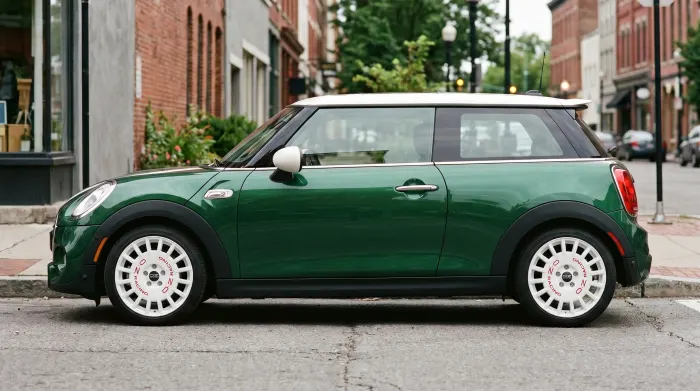
The short answer
If you want to compare several wheels on your own car quickly, a photo-based wheel visualizer is the practical choice. If you need a final image with precise manual control over every reflection and edge, Photoshop is the better tool.
Many people use both: the visualizer to choose a direction, Photoshop only when a finished image needs extra retouching.
What Photoshop requires
Photoshop can produce an excellent wheel change, but it is a manual process. You need to cut out the new wheel, match perspective, mask the original wheel and tyre, rebuild shadows and reflections, and blend the result into the car.
That control is valuable for a polished marketing image. It also takes skill and time, especially when the new wheel was photographed at a different angle or in different light.
- Select and mask the original wheel and tyre.
- Match the perspective of the replacement wheel.
- Rebuild contact shadows and reflections.
- Correct colour, contrast and sharpness.
- Check the result at full size, not only on a phone.
What a wheel visualizer does
A visualizer starts with two photos: your car and a wheel reference. The model generates a preview and keeps the car body, paint, angle, lighting and background in place.
The advantage is not that it replaces a professional retoucher. The advantage is that you can test a design in the context of your own car before spending time on a manual edit.
Side by side
| Job | Wheel visualizer | Photoshop |
|---|---|---|
| First look at a design | Fast: upload two photos | Slow: manual selection and masking |
| Your own car and paint | Keeps the original photo context | Depends on the editor’s mask and blending |
| Comparing several finishes | Easy to repeat | Repetitive, but possible |
| Final campaign image | Visual reference only | Best for detailed retouching |
| Skill required | Basic photo selection | Intermediate to advanced editing |
| Fitment confirmation | Not provided | Not provided by the edit itself |
When Photoshop is the better choice
- You need a final image for print or a campaign.
- The wheel and car photos need complex perspective correction.
- You need precise control over reflections, shadows and colour grading.
- A designer will retouch the image as part of a larger composition.
When a visualizer is the better choice
- You are still choosing between designs or finishes.
- You want to see the wheel on your own car, not a generic render.
- You do not have Photoshop skills or time for a manual edit.
- You want a quick visual reference before contacting a wheel shop.
A practical workflow
- Shortlist with the visualizerTest two or three wheel designs on the same car photo. Keep the photo and angle consistent so the comparison is fair.
- Choose a directionPick the design and finish that works with the car. Note what you like: spoke style, colour, lip or overall stance.
- Verify fitmentTake the shortlisted specification to a wheel specialist. Confirm offset, PCD, centre bore, brake clearance and tyre size.
- Retouch only if neededUse Photoshop when the final image needs more control than a preview can provide.
Read the two-photo preview guideCheck wheel sizes and fitment
Frequently asked questions
Is a wheel visualizer as accurate as Photoshop?
They are different tools. A visualizer is faster for a realistic first look on your own photo. Photoshop gives an editor more manual control for a final retouched image. Neither confirms fitment.
Can I use a visualizer for a final product image?
Use it as a visual reference. If the image will be used for commercial publication, have the final asset reviewed and, where necessary, retouched by a professional.
Do I still need to check wheel fitment?
Yes. Always confirm offset, PCD, centre bore, brake clearance, tyre size and load rating for your exact vehicle before ordering.
Put a wheel on your car before you buy it.
Upload one car photo and one wheel photo. Keep the car, change the wheels.
Generate