
Wheel buying guide
How to see wheels on your car before buying
A product photo shows the wheel. It does not show the wheel on your car. Here is a practical way to close that gap.
 Generate
- Use a clean, daylight photo of your own car.
- Use a straight-on wheel reference photo.
- Judge the look first, then verify fitment separately.
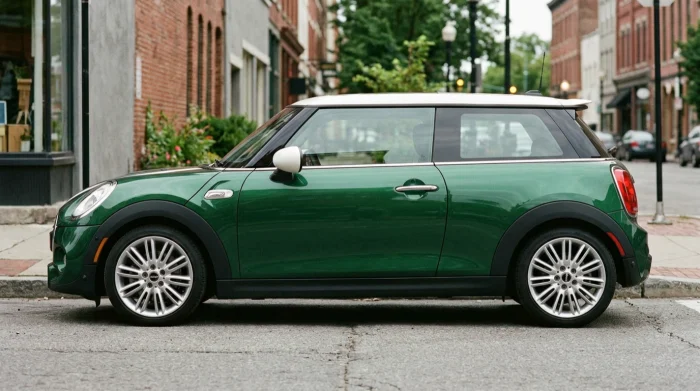 Before
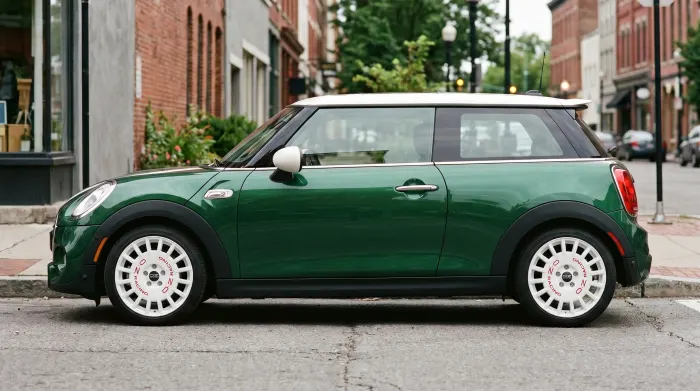 After
After
Why catalog photos are not enough
A catalog image is made to sell the wheel, not to show it in your wheel arches. It usually uses studio lighting, a generic vehicle and an angle chosen to flatter the spokes.
Your car brings different paint, ride height, arch shape, brake calipers and background. A wheel that looks compact in a product photo can fill the arches differently on your car. Gloss black can disappear against dark paint, silver can read brighter, and bronze can shift under warm light.
- Angle changes how large the wheel appears.
- Paint colour changes how the same finish reads.
- Ride height changes the gap between tyre and arch.
- Lighting changes highlights on spokes and lips.
A two-photo preview in four steps
- Photograph your carPark on level ground in daylight. Use a side or front three-quarter angle and keep all four wheels visible. Clean wheels help, but a realistic photo matters more than a perfect one.
- Choose a wheel referencePick a clear, straight-on photo of the wheel you are considering. A plain background and a complete wheel face make the result easier to judge.
- Generate the previewUpload both photos to the AI wheel visualizer. The preview keeps the car body, paint, angle, lighting and background, and changes the wheels.
- Compare before and afterLook at the full car first, then zoom in. Compare the same angle and lighting rather than switching between unrelated product shots.
What to check in the preview
A useful preview is not only about whether the wheel looks good. It should help you notice how the design interacts with the car.
- Proportion: does the wheel look too small, too large or just right in the arches?
- Stance: how much gap remains between the tyre and the body?
- Spoke direction: do the spokes lead your eye toward the centre or away from it?
- Finish: does the colour work with the paint, trim and brake calipers?
- Details: can you see the lip, centre cap and spoke profile clearly?
What a preview cannot confirm
A photo preview is a visual reference. It does not measure your car and it does not replace a fitment check.
Offset, PCD, centre bore, brake clearance, suspension clearance, tyre size and load rating still need to be confirmed for your exact vehicle. A wheel can look right in a picture and still not fit safely.
Before ordering, ask a wheel specialist to confirm the specification for your car. Do not drive on a setup that has not been checked for clearance and hardware compatibility.
A practical checklist before ordering
- Confirm the wheel specification for your exact model and brake package.
- Check tyre size, load rating and whether TPMS hardware is required.
- Ask about the correct lug bolts, centre rings and torque values.
- Check the seller’s return policy before mounting the tyres.
- Use the preview to shortlist the look, then verify the fit with a specialist.
Read the wheel size and fitment guideCompare a wheel visualizer with Photoshop
Frequently asked questions
Can I preview wheels with a phone photo?
Yes. A clear daylight photo from a side or front three-quarter angle is enough for a visual preview. A clean car and a straight-on wheel photo usually produce a more useful result.
Does the preview guarantee the wheel will fit?
No. The preview shows how the wheel looks on your car. It does not confirm offset, PCD, centre bore, brake clearance or tyre size. Those specifications still need to be checked.
How many photos do I need?
Two: one photo of your car and one reference photo of the wheel. The wheel should be clearly visible and reasonably straight-on.
Put a wheel on your car before you buy it.
Upload one car photo and one wheel photo. Keep the car, change the wheels.
Generate