
Try the wheel on before you buy it
AI Wheel Visualizer
Upload a photo of your car and a photo of the wheel you are considering. NICE RIM puts the wheel on your car and leaves the paint, ride height and background alone.
 Generate
- Two photos, one preview
- Your car and light stay the same
- Works in a phone browser
- One credit per preview
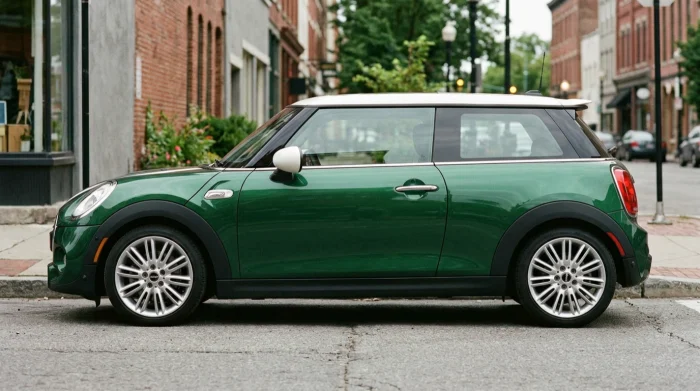 Before
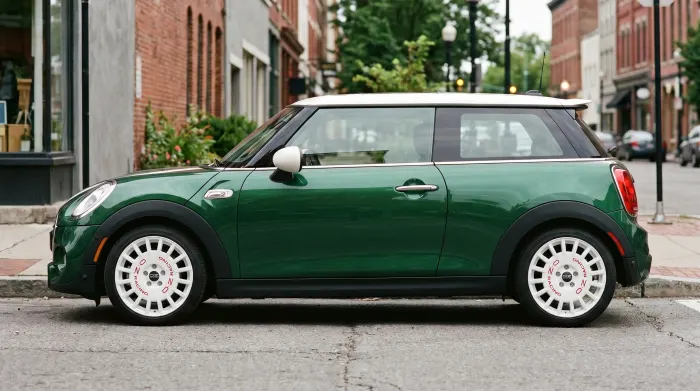 After
After
What you see
A photo of your car with a different set of wheels. The angle, paint, shadows and background stay the same.
That is more useful than a catalog shot when the car is lowered, has an unusual color, or is parked in light you know.
- Use a photo you already have, including one from your phone.
- Take the wheel image from a marketplace, a wheel shop or the manufacturer.
- Compare finish, spokes and how large the wheel looks.
- Uploads and previews stay private to your account.
How to make a preview
- Take a car photoA side or front three-quarter view in daylight. Keep the whole car in frame if you can.
- Find the wheelA straight-on photo with the full wheel face visible is easiest to work with.
- Upload bothPNG, JPEG or WebP, up to 5 MB each. No app needed.
- Look, then checkJudge the style first. Then confirm offset, PCD, brake clearance and tire size with a wheel shop.
What to look at
Start with size and stance. A wheel that looks right in a product photo can look too small or too aggressive on the car. Compare the wheel face with the fender gap and the tire sidewall.
Then look at color. Gloss black can disappear on a dark car. Silver picks up light. Bronze can look warm on green or blue and muddy on some reds.
- Spoke direction and symmetry.
- Lip depth and concavity from your angle.
- How much tire is visible under the fender.
When it helps
Use it before you buy a used set, ask a shop for a quote, or choose a finish. It also helps when you want to show a customer an idea without mounting a wheel.
If you are choosing between an OEM+ look and something more aggressive, preview both. The comparison usually settles it.
What it cannot tell you
The preview cannot measure offset, brake clearance or the space between the tire and the fender. It cannot prove that a wheel will fit.
Use it to choose the look. Check the numbers with a wheel specialist before you pay.
Rim, wheel or simulator?
A rim visualizer, a wheel simulator and AI wheels are usually asked for the same reason: you want to see the wheel on your own car.
NICE RIM does that with two photos. If you want the same preview with a focus on your car, start with the car wheel visualizer.
Frequently asked questions
What is an AI wheel visualizer?
It puts a wheel from a reference photo onto a photo of your car. The result is one image; the car, angle and background stay.
Do I need two photos?
Yes, one car photo and one wheel photo. The preview uses the wheel you are actually considering.
Can I use a phone photo?
Yes. A clear side or three-quarter photo in daylight is enough.
Does the preview show the exact wheel size?
No. It shows the wheel you upload, but it does not calculate diameter or offset. Check those with the seller.
Can I preview an SUV or truck?
Yes, as long as the photo is clear. The tool is not limited to a fixed car list.
How much does a preview cost?
One credit per image. Packs are bought through Stripe; the checkout shows the current price and terms.
Put a wheel on your car before you buy it.
Upload one car photo and one wheel photo. Keep the car, change the wheels.
Generate